ℹ️ Before you start
Historia Clínica CaVeSal® lets you record your patients' complete prenatal, gynecological and preconception history, with clinical reference guides, plotted follow-up growth curves, a plate Atlas to show your patient, and a full battery of printable documents (studies, leave/permits, surgical documents, prescriptions) — organized according to the CLAP/WHO model.
The demo is free, with no registration: you can load up to 10 patients, with complete medical records (all sections and fields) and local backup included. What stays locked until you activate the full-version key is: loading more than 10 patients, PDF, Word, email, WhatsApp, print, sending to the Calculator, reference guides, plotted growth curves, gestational-age autocomplete in Prenatal visits, and Google Drive sync.
| Feature | Demo | Full version |
|---|---|---|
| Number of patients | 🔒 Up to 10 patients | ✓ Unlimited |
| Medical record entry (all sections) | ✓ Included | ✓ Included |
| Atlas (plates to show the patient) | ✓ Included | ✓ Included |
| Local backup (.json) | ✓ Included | ✓ Included |
| Expanded clinical reference guides | 🔒 Locked | ✓ Included |
| Plotted follow-up growth curves | 🔒 Locked | ✓ Included |
| GA autocomplete on each prenatal visit | 🔒 Locked | ✓ Included |
| Export PDF / Word / email / WhatsApp / print | 🔒 Locked | ✓ Included |
| Send data to the Calculator | 🔒 Locked | ✓ Included |
| Google Drive sync | 🔒 Locked | ✓ Included |
While the key is not activated, the home screen shows an "Unlock the full version" banner, with the "Get the full version →" button and the "I already have a key" link for those who already purchased one. Once activated, the banner disappears and you get direct access to everything marked 🔒 in the table above, plus the ability to keep loading patients with no limit.

➕ Create or look up a patient
Tap the "New" button in the header to create a record, or the search icon 🔍 to resume an already-loaded patient, by entering her ID document (national ID, passport, or other).
Data is saved automatically as you type (autosave) — you can also tap "Save" at any time to force an immediate save.
All information is stored locally on your device, not on CaVeSal® servers.
🗂️ Sections of the medical record
The form is organized into side tabs, following the CLAP/WHO model. Many numeric and risk fields use the same names as the CaVeSal® Calculator, to allow direct data transfer between both apps.
Identification: ID document, last name, first name, date of birth, age (calculated automatically once the date of birth is entered, but still editable by hand in case it needs correcting), ethnicity, marital status, education level, occupation, address, 🆕 city/locality, phone/cell number, health insurance/coverage and emergency contact.
Family history: checkboxes for hypertension, diabetes, heart disease, tuberculosis, cancer, twin pregnancy, congenital malformations, and an "Other" field to specify.
Personal history (the most extensive section): 🆕 Blood typing (group and Rh factor) as a general patient history item — independent from the group/Rh recorded under "Current pregnancy," which is specific to that pregnancy. Also: chronic hypertension, pregestational diabetes mellitus, chronic kidney disease, asthma, heart disease (with WHO functional class), hypo/hyperthyroidism, thrombophilia, antiphospholipid syndrome, prior DVT/PE, immune thrombocytopenic purpura, von Willebrand disease, epilepsy, autoimmune disease, severe psychiatric illness, prior/active cancer, HIV, hepatitis B/C, syphilis, tuberculosis, recurrent UTI, prior surgeries, allergies, usual medication, other remarks, tobacco, alcohol, drugs, violence/social risk.
Gyn-obstetric history: 🆕 menarche, menstrual rhythm (regular/irregular), cycle pattern (cycle days/bleeding days), sexual debut, sexual activity (active/inactive/sporadic), contraceptive method and menopause — recorded as general history items, independent from the month-by-month detail of the Kaltenbach history-taking tool (Gynecology tab). Then: gravidity, parity, cesarean sections, miscarriages, 🆕 infected miscarriage (new checkbox, distinct from the numeric "Miscarriages" count — lets you flag that specific history item), ectopic pregnancies, molar pregnancies, children living, died in the 1st week or later, stillbirths, newborns <2500g or >4000g, end date of the previous pregnancy, interpregnancy interval. Risk checkboxes: prior preeclampsia, prior GDM, prior preterm birth, prior IUGR, prior macrosomia, prior fetal death, prior fetal malformation, prior postpartum hemorrhage, prior isoimmunization, prior cervical insufficiency, 🆕 prior postpartum depression and prior uterine surgery, plus a free-text field for other prior details/complications.
Current pregnancy: LMP (with a "reliable LMP" flag), EDD, date of the first ultrasound + GA reported at that ultrasound, pre-pregnancy weight, height (reused to calculate BMI in "Gynecological follow-up" and "Preconception"), pre-pregnancy BMI (calculated automatically), blood group and Rh factor, indirect Coombs, VDRL/TPHA, HIV, 🆕 toxoplasmosis (IgG/IgM), Chagas, hepatitis B (HBsAg), hepatitis C, rubella IgG, urine culture, OGTT (24-28 weeks) and GBS swab (35-37 weeks) — plus two live-calculated notes (current GA and re-dating) that have their own section further below, "Gestational age: LMP, early ultrasound and re-dating." 🆕 Vaccination: Tdap (tetanus-diphtheria-pertussis), flu, RSV, COVID-19 (with vaccine type) and Hepatitis B, each with a checkbox for given/immune, date, and, as applicable, GA at administration or season.
Admission physical exam: blood pressure, heart rate, temperature, breast exam, abdominal exam, gynecological exam, additional physical-exam remark — with reference guides specific to this tab (Early Obstetric Warning Score, MAP as a predictor, physical exam by pregnancy stage, embryo-fetal viability). The cervical cancer screening (Pap/HPV/colposcopy) and breast cancer screening (mammography) guides live under the Studies tab, not here.
Plan and remarks: designed as a summary of the current clinical picture — the most relevant data to have at a glance (e.g. "32 weeks, hypertension controlled with methyldopa, no other complications"). Includes pregnancy risk classification, identified risk factors, planned delivery plan, planned delivery institution, general remarks.
Prenatal visits: a separate tab for longitudinal follow-up, visit by visit, with reason for visit, gestational-age autocomplete, and plotted growth curves (see the dedicated section below).
Follow-up plan: unlike "Plan and remarks" (the general summary), here you record the detail of each visit over time — the chronological evolution of the clinical plan.
Studies: a simple record of the patient's labs, ultrasounds and other complementary studies, with date and result.
Study request: a different tab from "Studies" — here you generate the printable document (lab orders, ultrasound, preconception studies, menopause-related studies, etc.) to hand to the patient.
Leave certificates/permits and Surgical documents: printable certificates, statements and consent forms — see their dedicated sections below.
Gynecological follow-up: a tab for the patient's general gynecological visits (not related to the current pregnancy), with chronological records, weight/BMI tracking, and Gynecology History-Taking (Kaltenbach, MRS Scale, Voiding Diary).
Preconception and Fertility Consultation: a tab dedicated to preconception counseling, with the same chronological-record scheme as Gynecological follow-up, including height/weight/BMI.
Atlas: interactive plates to show your patient during the visit — see its dedicated section.
📚 Expanded clinical reference guides and languages
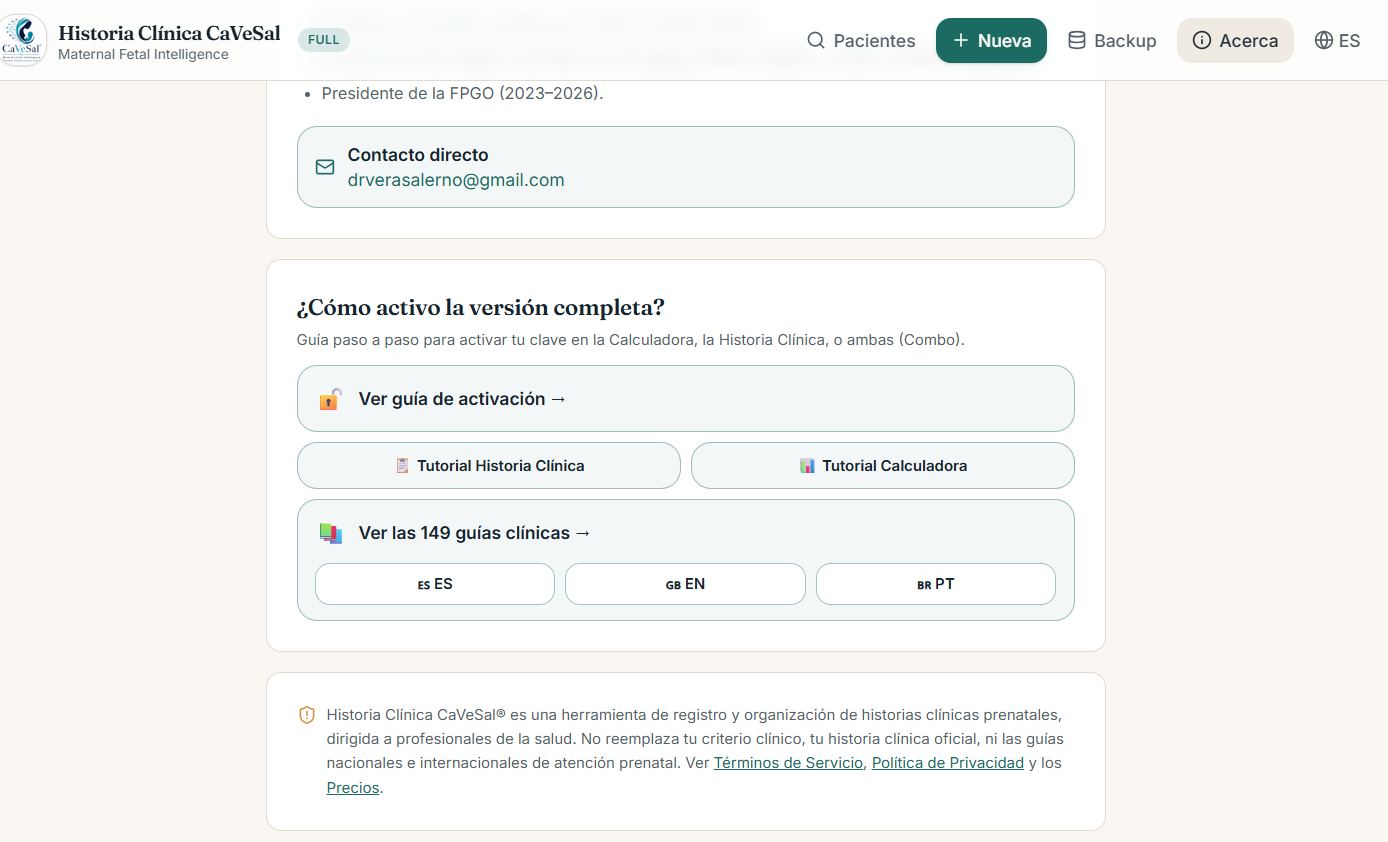
Each section comes with its own collapsible guides — in total, 149 expanded clinical guides distributed across 9 of the medical record's 15 tabs. Tap each tab below to see the full list:
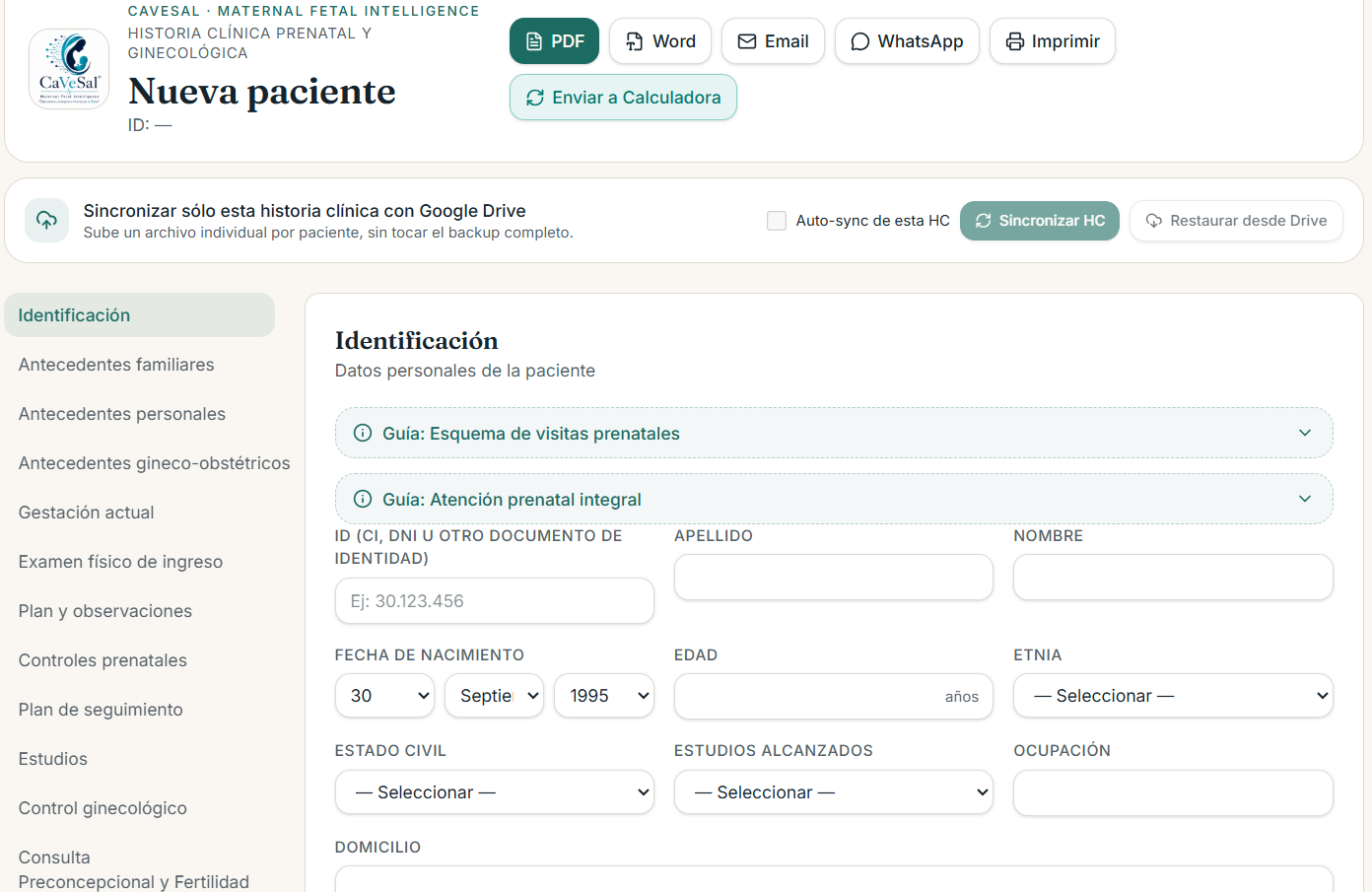
Identification — 2 guides
- Prenatal visit schedule
- Integral prenatal care
Personal history — 1 guide
- Safe physical activity during pregnancy
Current pregnancy — 57 guides
- Pregnancy duration and EDD
- Immunization during pregnancy
- Supplementation during pregnancy
- Labs by trimester
- Ultrasounds by trimester
- Nutrition and recommended weight gain
- Gestational Diabetes (4)
- Complete diagnostic algorithm
- Goals, self-monitoring and nutrition
- Hypoglycemia management and correction schemes
- Basal-bolus dosing and ISF calculation
- Hypertensive disorders of pregnancy (2)
- Classification and severity criteria
- Aspirin prophylaxis and antihypertensive management
- Dyslipidemia in pregnancy
- Intrahepatic cholestasis of pregnancy (ICP)
- IUGR and fetal Doppler — Definitions and diagnostic criteria
- IUGR (2)
- Barcelona/Gratacós staging (I-II)
- Barcelona/Gratacós staging (III-IV) and cutoffs
- HIV in pregnancy — Diagnosis and treatment
- Syphilis in pregnancy — Diagnosis and treatment
- Hepatitis B in pregnancy
- Hepatitis C in pregnancy
- Chagas disease in pregnancy
- Toxoplasmosis in pregnancy — Diagnosis and treatment
- Rubella in pregnancy
- Cytomegalovirus (CMV) in pregnancy
- Rh Isoimmunization (4)
- Diagnostic algorithm (ICT/Coombs)
- MCA Doppler
- Alternative method with amniocentesis (Liley)
- Algorithm by GA and intrauterine transfusion
- Hypothyroidism and hyperthyroidism — Values by trimester
- Hypothyroidism — Hashimoto's (Anti-TPO) and preconception approach
- Cervical insufficiency and cervical length
- Progesterone in pregnancy — Uses, indications and evidence
- Venous thromboembolism (VTE) — Epidemiology and physiology
- VTE (4)
- Diagnostic algorithm for DVT and PE
- Postpartum risk assessment and thromboprophylaxis
- LMWH and anticoagulation schemes
- Peripartum management and neuraxial anesthesia
- Antiphospholipid Syndrome (APS) and thrombophilias
- Absolute contraindications to LMWH
- Breastfeeding — Latch technique and management
- Puerperal mastitis — Diagnosis and treatment
- Hypertensive disorders — Magnesium sulfate (seizures)
- Threatened preterm labor (PTL) — Diagnosis and tocolysis
- Fetal lung maturation (antenatal corticosteroids)
- Fetal neuroprotection with magnesium sulfate
- Preterm Premature Rupture of Membranes (PPROM) — Diagnosis
- PPROM (2)
- Management by gestational age
- Latency antibiotic regimens and immediate-delivery criteria
- Hyperemesis gravidarum (2)
- Diagnosis and PUQE score
- Stepwise treatment and rehydration protocol
- Amniotic fluid disorders (2)
- Measurement methods and diagnostic criteria
- Etiology
- Polyhydramnios — Severity classification
- Acute gastroenteritis (AGE) and pregnancy — Etiology, management and antibiotic therapy
- Respiratory infections (COVID-19, Influenza and ILI) in pregnancy
- Dengue and pregnancy
Admission physical exam — 4 guides
- Early Obstetric Warning Score
- Mean Arterial Pressure (MAP) as a predictor
- Physical exam by pregnancy stage
- Embryo-fetal viability
Plan and remarks — 2 guides
- Pregnancy risk classification
- Family planning
Prenatal visits — 1 guide
- Fetal growth: SGA / IUGR / AGA / LGA
Studies — 17 guides
- Cervical cancer screening: Pap / HPV / Colposcopy
- Breast cancer screening: Mammography
- Cervical cancer (2)
- Screening and management algorithm (HPV/Pap)
- FIGO staging
- Mammography and BI-RADS (2)
- Breast density and categories 0-3
- Categories 4-6 and management
- Ovarian tumor — IOTA Simple Rules and O-RADS system
- Bethesda 2014/2020 system — Cervical cytology (Pap)
- IFCPC consensus — Colposcopic classification
- ASCCP algorithms (3)
- Risk-based principle and management by cytology
- Management by biopsy (CIN 1, CIN 2/3)
- Post-treatment follow-up (post-LEEP/cone)
- Thickened endometrium (3)
- Management in reproductive-age women
- Postmenopausal women
- Adolescents
- IETA classification (2)
- Endometrial thickness and echogenicity
- Doppler vascular pattern
Gynecological follow-up — 47 guides
- Infectious vaginitis and vaginosis
- Pelvic Inflammatory Disease (PID)
- Polycystic Ovarian Metabolic Syndrome (POMS) — formerly 'PCOS'
- Adenomyosis — MUSA ultrasound criteria
- Endometriosis — Staging
- Uterine fibroids — FIGO classification
- Cystocele — POP-Q classification
- Urinary incontinence — Stress vs. Urgency and treatment
- MRS Scale and Hormone Replacement Therapy (HRT)
- Osteoporosis and bone densitometry (DXA)
- WHO Medical Eligibility Criteria (MEC) for contraception
- Contraception during lactation and postpartum
- Abnormal uterine bleeding (AUB) — FIGO PALM-COEIN classification
- Amenorrhea — Definitions and diagnostic algorithm
- Ovarian and endometrial cycle — Physiology by phase
- Primary amenorrhea — Diagnostic algorithm
- Secondary amenorrhea — Management by cause
- Precocious puberty (2)
- Diagnosis
- Pharmacological management (axis suppression)
- Care for sexual violence survivors (4)
- Principles and history-taking
- Physical exam and sample collection
- Emergency contraception and STI prophylaxis
- HIV prophylaxis and legal/mental-health management
- Tanner scale — Stages of pubertal development
- Bone-age assessment by hand/wrist X-ray
- Müllerian malformations (2)
- Agenesis and unicornuate uterus (Class I-II)
- Didelphys, bicornuate, septate, DES-related (Class III-VII)
- Urogenital sinus anomalies and diagnostic algorithm
- Hysteroscopy (4)
- Technical principles and distension media
- Anatomical classification of the cervical canal
- Diagnostic indications and surgical techniques
- Prevention and management of major complications
- Urethral continence — Anatomical-functional basis and diagnostic evaluation
- Stress urinary incontinence (3)
- Conservative management and minimally invasive therapies
- Office-based minimally invasive therapies
- Standard surgical management
- Breast self-exam — Technique
- STI panel in gynecology — Diagnostic tests
- Neisseria gonorrhoeae — Updated treatment
- Common co-infections and mild-to-moderate PID
- Chlamydia, Mycoplasma genitalium and Ureaplasma
- Abnormal uterine bleeding (2)
- Medical treatment
- Surgical indications by cause
- Healthy lifestyle — Nutrition and exercise in reproductive years and menopause
- GLP-1/GIP analogues (Semaglutide, Tirzepatide) — Dosing, indications and safety
- Sexual health during reproductive years
- Sexual health at menopause and post-menopause
Preconception and Fertility Consultation — 18 guides
- Ovarian and endometrial cycle — Physiology by phase
- Female hormonal profile in fertility
- Work-up algorithm — Female factor
- Semen analysis and PMS (Male factor)
- Preconception screening and folic acid
- 2025 WHO approach to infertility work-up
- Ovulation induction, timed intercourse and COS
- Natural timed intercourse — Calendar, ovulation test and cervical mucus
- Hyperprolactinemia — Diagnosis and treatment
- Cervicovaginal microbiota — CST profiles (Community State Types)
- Microbiota, cervical stroma and carcinogenesis — Impact on HPV/cervical cancer
- Microbiota and stroma — Impact on fertility, implantation and management
- Estrobolome (3)
- Definition and the hepato-enteric estrogen axis
- Dysbiosis: hyper- and hypoestrogenism
- Management and modulation strategies
- Preconception risk (3)
- Green level (low risk)
- Yellow level (moderate)
- Red level (high risk)
Tap the guide's title (with the ℹ️ icon) to expand its content.
Each guide cites its source (organization + year) at the bottom, written in CaVeSal's own words, not copied from the original guidelines.
From "About" you can open the full list of expanded guides as a separate page, in Spanish, English or Portuguese — useful for reference or sharing outside the form.
📐 Gestational age: LMP, early ultrasound and re-dating
🆕 New sectionUnder "Current pregnancy" you now have, next to the LMP, the fields "Date of that ultrasound" and "GA by early ultrasound" to record the raw data from the pregnancy's first ultrasound. Historia Clínica records this data — correcting the LMP based on the ultrasound (re-dating) is something you apply yourself, using clinical judgment or the Calculator; the medical record never calculates it on its own.
GA by LMP (as of that ultrasound's date) is now calculated automatically, from LMP + the date of the first ultrasound — so you can compare it at a glance against "GA by early ultrasound" (what the sonographer reported), without doing the math by hand.
"Current GA (today)": a note always visible under Current pregnancy, showing today's gestational age calculated by LMP and, if you've already entered a corrected LMP, also by corrected LMP — so you can see the pregnancy's current status without having to go to Prenatal visits.
Re-dating note: below the first-ultrasound fields, an informational note recalls the correction criterion based on that ultrasound's trimester (1st trimester: correct if the LMP-ultrasound difference is ≥5 days; 2nd trimester: ≥7 days; 3rd trimester: not corrected). It's for reference only — you fill in the "Corrected LMP" field by hand, after applying the criterion (in the Calculator or by your own judgment).
img/manual-hc-eg-redatacion.png📈 Prenatal visits and plotted growth curves
Each visit is recorded with its date, and is automatically exported into the PDF and Word table.
In the "Prenatal visits" tab, record each visit: 🆕 reason for visit (its own free-text field — moved here from "Current pregnancy": it's now part of each visit, not a single fixed pregnancy-level value), date, gestational age, weight (kg), BP, fundal height (cm), FHR (bpm), fetal movements, presentation, edema, Hb, TSH, cervical length, Doppler, next visit, and remarks.
🆕 LMP / Corrected LMP toggle: above the form, choose the basis for calculating the gestational age of each new visit — LMP or corrected LMP, with the reference dates in view. You can change it at any time: a change only affects visits you add from then on, and never rewrites the GA already saved on past visits.
🆕 GA autocomplete: when you open "+ Add visit" (a new entry, not when editing an already-saved one), the gestational-age field preloads automatically based on the toggle's chosen basis and that visit's date — and updates if you change the date, as long as you haven't typed a different value by hand. It stays editable all the same: if a specific clinical adjustment is needed, you can overwrite it without any issue.
Tap "+ Add visit" to add it to the table — the list stays sorted and shows summary columns (Reason, Date, GA, Weight, BP, FH, FHR, Mov., Presentation, Remarks), with the option to delete any recorded visit.
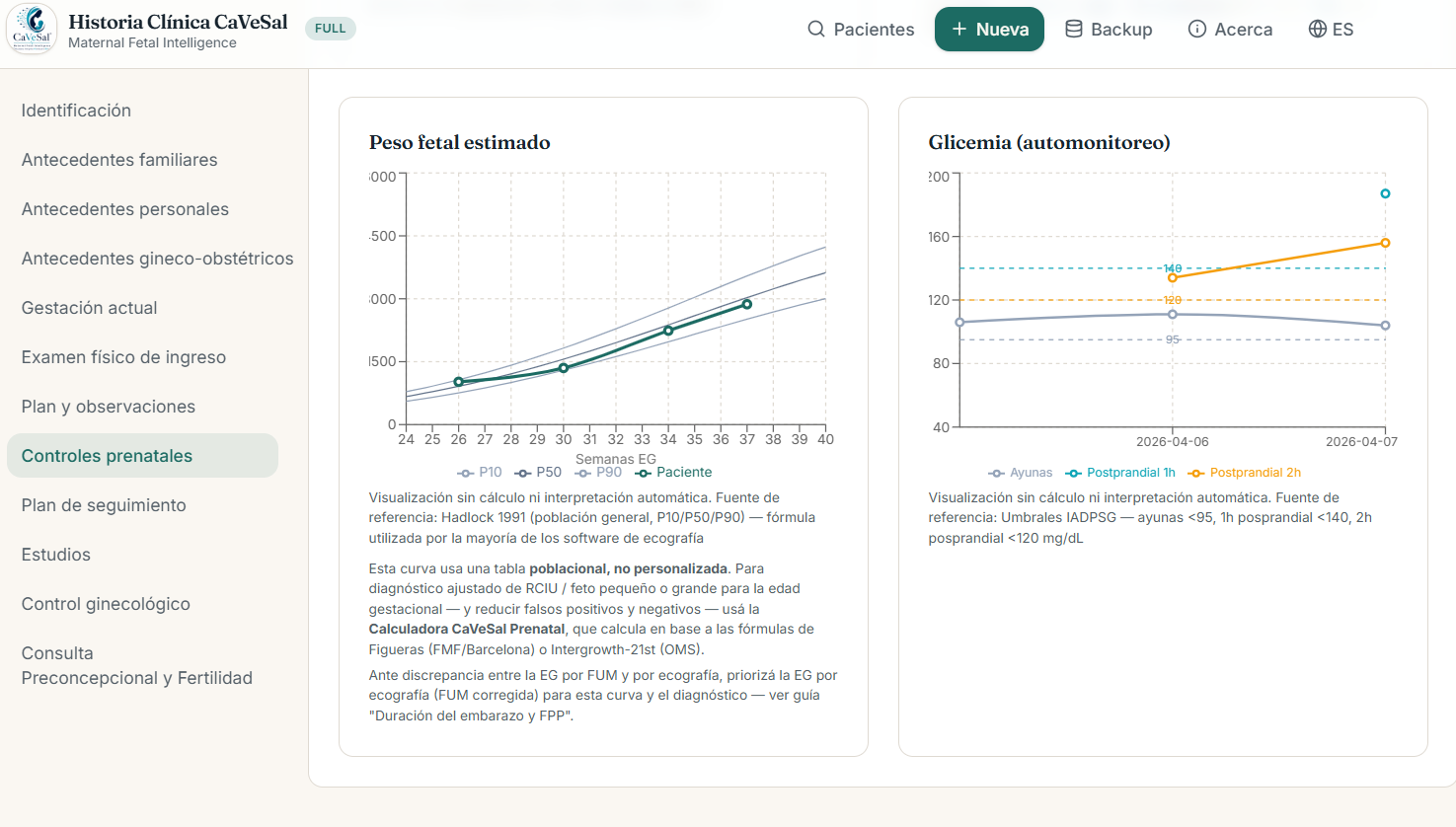
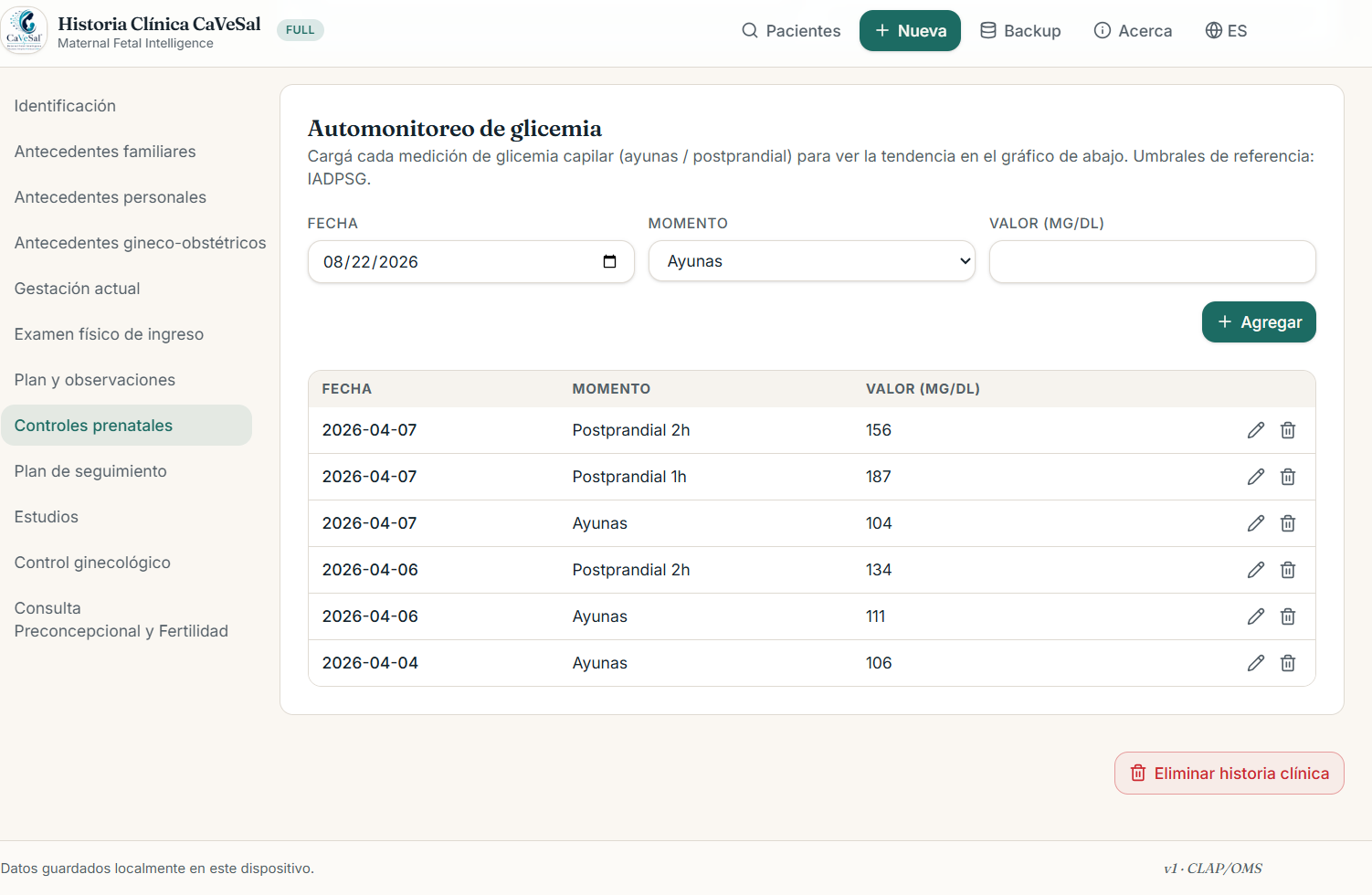
🔒 With the full version, plotted growth curves are generated automatically below the table, positioned according to each data point's GA week, with nothing to plot by hand: fundal height (CLAP-PAHO/WHO P10/P50/P90 bands), blood pressure (systolic/diastolic, with alert lines), maternal weight trend, estimated fetal weight, and glucose self-monitoring.
Estimated fetal weight. It's plotted automatically from the values you record under Studies → Ultrasounds (the "Estimated fetal weight" field, see that section) — nothing new needs to be entered here. The curve uses the Hadlock 1991 table as its reference (population P10/P50/P90), the formula used by most ultrasound software.
Glucose self-monitoring. It has its own form, below the rest of the curves: date, timing (fasting / 1h postprandial / 2h postprandial) and value (mg/dL). Tap "+ Add" to add it to the table — each timing is plotted as a separate series, with reference lines based on the IADPSG thresholds (fasting <95, 1h postprandial <140, 2h postprandial <120 mg/dL).
img/manual-hc-controles-motivo-toggle.png📝 Follow-up plan
Chronological record of medical conduct at each visit — with legal significance. Unlike "Plan and remarks" (the overall clinical-picture summary), this is where the detail of what was decided at each specific visit is kept, in date order.
Enter the date and the conduct/plan for this visit (free text — e.g. "Relative rest and follow-up in 1 week. New Doppler ultrasound requested for elevated BP").
Tap "+ Add" to add it to the history — each entry is listed with its date, and you can delete any of them if needed.

🔬 Studies
Labs, ultrasounds and other patient studies, with date and result — organized into 3 sub-blocks. It's a simple record, to have on hand what was done and with what result; to generate the printable order document, use the "Study request" tab (next section) — they are two different tabs, don't confuse one with the other.
Labs: date, type (🆕 not just by trimester: 1st/2nd/3rd trimester, Preconception, Postpartum, Gynecological, Menopause/Climacteric, or Other), result (normal/abnormal), and remarks.
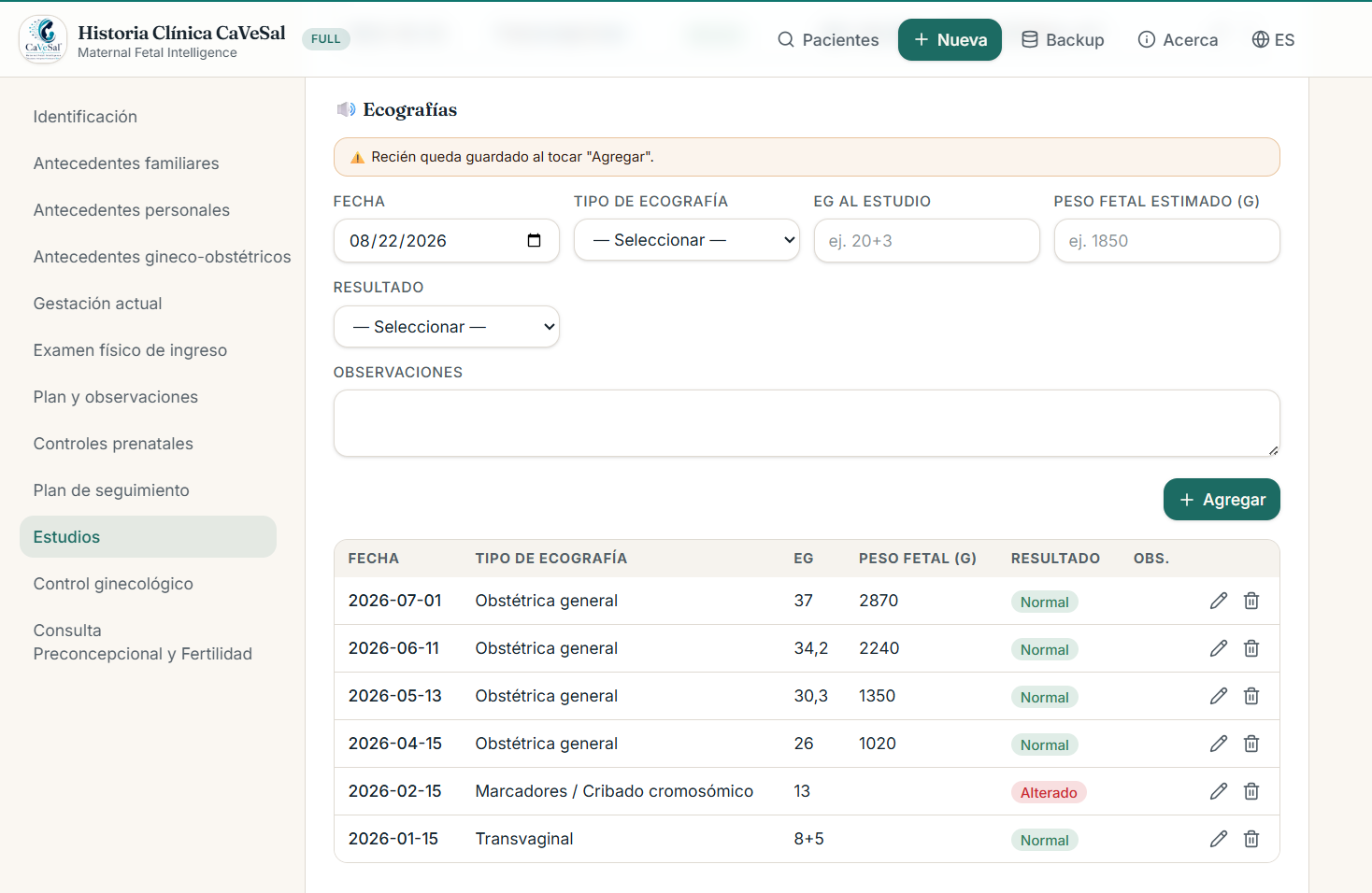
Ultrasounds: date, ultrasound type (e.g. transvaginal, markers/chromosomal screening, general obstetric), GA at the study, estimated fetal weight (g), result, and remarks.
Other studies: date, study type (Pap, Pap + Colposcopy, high-risk HPV (alone), Pap + high-risk HPV, Pap + Colposcopy + HPV, 🆕 Colposcopy (alone), Pathology/biopsy result, mammography, breast ultrasound, bone densitometry, hysterosalpingography, or other), result, and remarks — with the cervical and breast cancer screening guides included right there.
In each sub-block, tap "+ Add" to add the record to its corresponding table, with the option to delete.
🧾 Study request
Here you generate the printable document for ordering studies — different from the "Studies" tab (which is just a date/result record, generating no PDF). It has 3 fields common to all documents: Date, Urgent (if not checked, the PDF reads "Routine") and Reason / Dx (optional) — this last one covers what some insurers ask for as "diagnosis": if filled in, it's printed as "Reason/Dx: ..." on the document, regardless of the type of order. All documents close with the "Physician's Signature and Stamp" space.
General printing rule, the same across every document in this tab: only what was actually checked or typed shows up on the PDF — never an unchecked item or an empty field.
Lab work (by trimester): a 1st/2nd/3rd-trimester checklist, with the self-checking TORCH panel by group and mutually exclusive alternatives (Syphilis VDRL/rapid test, HIV serology/rapid test, PAI/Coombs), plus a general lab block by category (includes a "Genetic carrier panel" item with free text to specify which) and an "Other" field per trimester. 🆕 In the 1st trimester, TPOAb and anti-thyroglobulin antibodies were added (autoimmune thyroiditis screening). In the 2nd and 3rd trimester, an "Optional, not routine" block was added with thyroid panel and indirect Coombs — to repeat them at a specific point (e.g. Coombs in Rh-negative patients before the anti-D gammaglobulin at week 28), without making them routine for every patient.
General order: a free-text textarea, one line per order, for any request that doesn't fit the pre-built templates.
Other studies: cytology (Pap, Colposcopy, HPV genotyping, Biopsy + LEEP), non-routine ultrasounds (breast, upper abdomen, abdominal, renal), imaging (diagnostic/therapeutic hysteroscopy, hysterosalpingography, mammography, densitometry), and CT/MRI/X-ray with region and contrast in free text.
General lab work (combines with A): the same checkable block by category mentioned above.
Ultrasound: a checklist by trimester (each with its approach route), plus a general block (cervical length, markers, morphology, uterine/maternal-fetal/ductus venosus/ophthalmic/isthmus/gynecological/placental Doppler, biophysical profile with or without monitoring) and the Obstetric and Gynecological Ultrasound blocks with route (transvaginal/abdominal) and indications.
Preconception and Fertility: day-2 hormonal checklist (FSH, LH, Estradiol, free/total/bioavailable Testosterone, Androstenedione, DHEA, S-DHEA, Prolactin, thyroid panel, AMH, 17-OH-Progesterone), progesterone level with a window calculated from cycle length, and other items (hCG thresholds, etc.).
Menopause/Climacteric: a broad checklist — CBC, coagulation panel, protein panel, electrolytes, glucose, HbA1c, lipid/renal/liver/thyroid panels, calcium/magnesium/phosphorus, vitamins B6/B12/D, serologies (VDRL, HIV, Hepatitis B, Chagas), FSH/LH/Estradiol, urinalysis/urine culture, vaginal/endocervical discharge, plus an "Other" field.
🆕 General gynecological (new document, 2026-10-03): a checklist for a routine gynecological visit — different from Menopause/Climacteric and from Preconception/Fertility (cycle day 2). Routine: CBC, glucose, lipid panel, thyroid panel, urinalysis + urine culture, vaginal discharge, Vitamin D, Calcium, Ferritin + transferrin saturation, Hepatitis B. HPV genotyping and endocervical discharge are deliberately duplicated here from "C · Other studies" (so you don't have to switch tabs during a routine visit) — Pap, on the other hand, stays only in C, not duplicated here. Alternatives: Syphilis (VDRL/rapid test), HIV (serology/rapid test). Optional, not routine (only on specific clinical suspicion): FSH, LH, Estradiol, Prolactin, free/total Testosterone.
img/manual-hc-solicitud-estudio.png🩹 Leave certificates, permits and prescriptions
A tab with 🆕 9 printable certificates/statements, plus prescriptions, all with an editable issue date (not fixed to today's date — you can correct it if the document is issued on a day other than the visit's):
Leave certificate (generic): visit date and time, Diagnosis (optional), 🆕 Remarks (optional) — a new field, separate from Diagnosis, to briefly explain why that patient with that diagnosis is being placed on leave, days of leave, leave from/to, issue date, and a checkbox to include the professional-confidentiality text (Law 1626 — Paraguay, physician-patient confidentiality) in the PDF.
Medical leave for hospitalization.
Companion/escort statement.
Gynecological/obstetric visit statement.
Pregnancy statement.
Maternity statement (maternity leave), with 3 day-count options to choose the one that applies: 126 days (18 weeks) — the general criterion; 24 weeks — specifically for prematurity, low birth weight, or a congenital condition; or 126 days + 30 additional days per extra child — for a multiple birth.
Medical certificate of physical fitness (pregnancy).
🆕 Procedure coverage request (new document, designed for health insurers): procedure (with clickable shortcuts — Hospitalization, Cesarean section, Hysterectomy, Oophorectomy, Hysteroscopy, Specialist referral, Videolaparoscopy, Other — which get appended to the text), date, hospital/clinic, issue date, coverage checklist (Operating fee, Supplies, Hospitalization), a self-checking Professional fees group (Surgeon, First assistant, Second assistant, Instrumentalist, 🆕 Anesthesiologist, Pediatrician, Other professional (for comorbidities requiring an additional specialist) — with a "Select all" button and individual unchecking, in the same style as the Study request tab's TORCH panel), and (presumptive) Diagnosis.
🆕 Hospitalization order (new document, accompanies the Coverage request — requested for the same procedure): procedure (same clickable shortcuts as the previous document), date of the procedure, hospital/clinic, (presumptive) diagnosis, issue date, and instructions (free text).
At the bottom of the tab there's also a Prescription tool, for generating instructions/prescriptions.
img/manual-hc-reposos-permisos.png🔪 Surgical documents
🆕 4 independent printable documents, designed for surgeries and procedures:
Authorization for medical and/or surgical treatment: date, time, attending physician, proposed operation, and 2 witnesses (names optional).
Consent for surgical procedures: the complete informed-consent text (9 points), with date, surgeon, procedure, date of the procedure, clinic/hospital, additional specific complications, approximate days until final discharge, allergies, and an optional block if the patient is a minor (age, and name/relationship/ID document of the responsible signer).
Preoperative evaluation: a structured risk form — proposed surgery, service, estimated functional capacity (METs), cardiac risk by surgery type (high/intermediate/low), Goldman score, ASA class (I-VI), findings, comments and suggestions. The PDF always prints the complete reference tables (METs, Goldman, ASA), so you don't have to look them up separately.
🆕 VSC — Informed consent for Voluntary Surgical Contraception (new document, official MSPyBS Paraguay / USAID-ASSIST model): procedure type (tubal ligation or vasectomy), responsible physician, clinic/hospital, place and date (optional), witness name (optional), health-personnel name (optional), and a checkbox to include the model's official notes.
img/manual-hc-documentos-quirurgicos.png🩺 Gynecological follow-up and Gynecology History-Taking
A tab for the patient's general gynecological visits, not related to the current pregnancy — with chronological records, weight/BMI tracking, and 3 specific history-taking tools.
Visit record
Enter the date, 🆕 the "Reason for visit" (its own field, separated out — it previously shared a single field with the conduct/plan), the height (cm) and weight (kg) (both optional), and the "Conduct / Plan for this visit" (free text, a second field, separate from the reason).
If you enter height and weight, the app calculates BMI automatically, live. Height is preloaded from "Current pregnancy" if it already exists, but stays independently editable — useful for a purely gynecological patient, with no obstetric data on file.
Tap "+ Add" to add the visit to the table — with the option to delete any of them. Each list entry shows, when applicable, "Reason:" on one line and the conduct/plan below it.
🔒 With the full version, the BMI trend over time is plotted below the table, with WHO reference bands: underweight (<18.5), normal (18.5–25), overweight (25–30) and obesity (≥30).
Gynecology History-Taking
🆕 New sections in the manualKaltenbach (menstrual rhythm): record cycle by cycle using the classic cycle-days/bleeding-days notation (e.g. "26/6"). Enter the start date (that cycle's LMP), cycle and bleeding duration in days, and flow intensity by day ranges (from-day/to-day/intensity: light, moderate, heavy — with an "Add range" button). The app automatically suggests the next cycle based on the last one saved, and plots the last 4 cycles as a continuous timeline.
MRS Scale (Menopause Rating Scale): an 11-item checklist with a severity selector per item (from "None" to "Very severe"), with no automatic score total. Includes an interpretation guide switchable between the NAMS/Heinemann scheme and SOCHEG, by domain.
Voiding Diary: tracking (usually for 1 week) with date, time, fluids ingested, voids, urine loss (none/mild/moderate/heavy), sense of urgency (yes/no), and what the patient was doing at the time of the loss. Shown as an editable/deletable chronological table.
Patient worksheets (separate section, below the 3 above): 4 blank half-letter-size PDFs, with name and issue date preloaded, for the patient to fill out at home for self-monitoring: Voiding Diary (7 days, 4 rows per day), Weekly weight tracking (12 weeks), Blood pressure tracking (7 days, 3 readings/day), and Glucose tracking (7 days, fasting + 1h/2h postprandial for each meal).
img/manual-hc-control-ginecologico.png🤰 Preconception and Fertility Consultation
A tab dedicated to preconception counseling, with the same chronological-record scheme as Gynecological follow-up.
Enter the date, 🆕 the "Reason for visit" (its own field, separate from the conduct — same change as in Gynecological follow-up), 🆕 height (cm) and weight (kg) (both optional, new in this tab — previously only available under Gynecological follow-up), and the "Conduct / Plan for this visit" (free text).
Same as in Gynecological follow-up: if you enter height and weight, the app calculates BMI automatically and plots it over time (with the full version). Height preloads automatically from "Current pregnancy" if it already exists.
Tap "+ Add" to add the visit to the history — with the option to delete any of them.
img/manual-hc-preconcepcional.png🖼️ Atlas — plates to show your patient
🆕 New tabThe CaVeSal Atlas is 42 interactive plates designed for you to show your patient, during the visit, anatomy, findings and procedures in a didactic way — it opens embedded right inside Historia Clínica, without leaving the app.
Tap "Atlas" in the main menu (or the featured card on the home screen) to open it full-screen. At the top you have "Back" and "Open in another tab" (if you'd rather have it in a separate window, for example to share your screen).
Below the header you'll see a fixed message that reminds you of this tool's purpose: "This Atlas is meant for you to show your patient, in a didactic way, what is happening to her." — designed to distinguish it from a future, separate, clinician-oriented Atlas.
At the bottom of the screen there's a collapsible "Invite your patient" panel with 2 QR-code cards: CaVeSal® Mamá and CaVeSal® Mujer — see the detail in the "CaVeSal Ecosystem" section below.
img/manual-hc-atlas.png📲 CaVeSal Ecosystem — invite your patient
🆕 New sectionDesigned for a practice that only has Historia Clínica installed (without the patient-facing apps): both on the app's home screen and at the bottom of the Atlas, you'll find 2 cards inviting your patient to install, for free, the app that fits her:
CaVeSal® Mamá: pregnancy, birth, breastfeeding and baby development.
CaVeSal® Mujer: gynecological health and cycle tracking, outside of pregnancy.
Each card has an "Open for free" button (in case the patient is looking at your screen at that moment) and a QR code for her to scan with her own phone. If the patient has either app installed, she can also use her own Atlas to show you questions during the visit — it works both ways.
img/manual-hc-ecosistema.png📤 Export: PDF, Word, email, WhatsApp, print
From the patient's card, tap the corresponding button: PDF, Word, Email, WhatsApp, or Print.
You'll see a consent dialog before each export — a safeguard to confirm the sending of sensitive clinical data.
The PDF and Word documents include every loaded section organized into tables (Field/Value), the prenatal-visits table (including the "Reason" column), and the CaVeSal® logo in the header with the generation date.

🔄 Send data to the Calculator
Tap the "Send to Calculator" button on the patient's card.
The app saves the data immediately and opens the CaVeSal® Calculator in a new tab, with the general data, obstetric history, personal history and vaccination history already loaded (e.g. age, LMP, reason for the last visit) — without you having to type them in again by hand. If you had already sent this same patient before, the Calculator recognizes her by her ID document and merges the new data into the same record, instead of duplicating her.

☁️ Backup and Google Drive sync
Local backup (available in demo and full): from the "Backup" tab, you'll see patient/visit counters and the backup version, plus two cards: "Download backup" (generates a single .json file with every medical record and visit, including glucose readings and studies) and "Import backup" (choose a previously downloaded .json, with the option to "Import (merge)" or "Replace all").
🔒 Google Drive sync (full version): paste in your own Google OAuth Client ID (with a "How do I get my Client ID?" guide included) and save it. The app uploads a single 🆕 `cavesal-hc-backup.json` file to your Drive and keeps it updated with one click — it can only see the files it creates itself (the `drive.file` scope).
Tap "Sync now" to upload it manually, or check "Sync automatically when saving or closing a record" so it updates itself.
From this same screen you can also tap "Replace all from Drive" to download the complete backup stored in your Drive and use it to replace everything on this device (an irreversible action, meant for setting up a new device). 🆕 There's also an individual toggle inside each patient's own record, "Auto-sync this record" — an extra option, only for specific cases where you want to exclude that one patient from the general backup/sync; it's not a required step.

🔗 More CaVeSal® resources
Already have your key? Want to see the rest of the suite?
Questions about a feature? Write to us at drverasalerno@gmail.com · Last updated: October 2026